

 Continue with Google

 Share on media
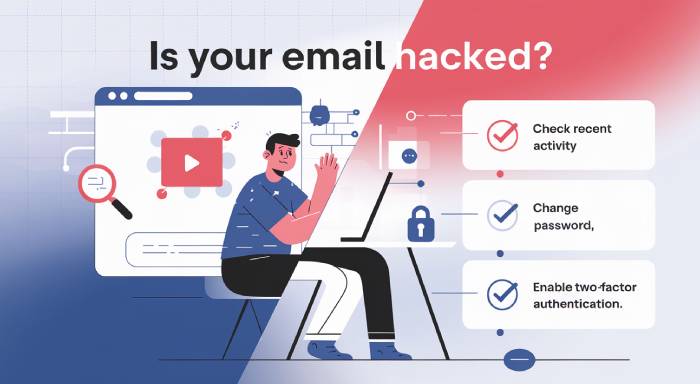
Your email account is connected to almost every part of your digital life, from banking and shopping to social media and work accounts. If a hacker gains access to it, they may be able to reset passwords, steal personal information, impersonate you, or compromise other online accounts.
But how can you tell if your email has been hacked? In this guide, you’ll learn the warning signs of a compromised email account, what to do immediately to recover it, and practical steps to prevent future attacks.
How Cyberattackers Gain Access to Your Email Account
Understanding attack methods helps you stay ahead of threats. Some common techniques include:
- Phishing emails that trick you into revealing passwords
- Weak or reused passwords across multiple platforms
- Malware or spyware installed on your device
- Public Wi-Fi network interception
- Credential leaks from third-party websites
Cybercriminals often combine multiple methods to gain full control of your inbox.
How to Identify Whether the Email Has Been Hacked or Not?
Multiple factors like phishing, compromise of your Wi-Fi network, malware, etc can lead to email hacking. The following points indicate a few signs that point toward email hacking-
You Cannot Login:
It is almost as if someone gained access to your house and changed the lock. If you find yourself in a situation where you cannot sign in even if you are typing the right password, then it is a clear signal of your account being compromised. For some reason, a cyberattack may have gotten access to your email account and changed your password.
You must respond quickly when your email is hacked and recover your account as quickly as you can. Otherwise, a cyberattacker can gain access to other accounts, spam your contacts, and steal your financial information.
You Get a Security Notification:
Nowadays, a lot of email providers have become quite proactive when it comes to cybersecurity issues. They immediately send a notification to the user whenever they encounter suspicious activity on your account. So, if you receive a notification or security alert from your email service provider, then you need to be extra cautious.
It might be an indication that your account might have been compromised. A reliable service provider like Google regularly informs users whenever there is an unsuccessful login attempt or when the password has been changed. You might also get a notification if someone tries to gain access to your account from an unusual location.
Change in Account Settings:
A cyberattacker not only gains access to the account but also makes it harder for the user to regain access. Cyberattackers might change account settings like phone number, email address, or other information to make it difficult for you to regain access to your account.
They can nefariously set up email forwarding settings that allow them to track all the emails you receive. Keep an eye on your account settings from time to time to make sure everything is in order.
Some Emails Might Be Missing or Some Suspicious Emails Might Appear:
Look for any kind of emails that you were not expecting or never received before, or emails that were there, but you cannot find them now. Unexpectedly deleting or receiving emails might be an indication that an attacker has gained access to your account. Primarily, cyberattackers delete emails to make it tougher for you to notice their presence or activity in your account. If you are regularly observing unusual outgoing or incoming emails, then it might be a sign that your email has been hacked.
You Get Password Reset Messages or Emails:
Cyberattackers aim to gain access to other accounts by resetting your credentials and then tracking the reset emails. Getting a notification or message about a password reset, especially when you haven’t requested is a firm indication that your email is attacked. It is also probable evidence that the cyber attacker is also aiming to hack into other services or accounts.
Now, let us know the next course of action when it is established that the hacker has gained access to the account.
Why Do Cyberattackers Attack Your Email?
For cyberattackers, your email account is almost like a safe house where you store a great deal of personal, sensitive, and financial data. Take the example of a number of online accounts that can be linked to your email account. Ranging from social media handles, e-commerce platforms, to bank websites, your email account tethers you to all aspects of the digital world. So, it is like a gold mine for an attacker who wants to impersonate you, damage your identity, or steal your finances.
What to Do When Your Email Is Hacked?
Safeguarding your email account is crucial to protecting your data, finances, and other accounts. Here’s what you need to do when you find out that your email account has been breached-
- Get Access to Your Account: If you are sure that a cyberattacker has gained access to your account, do not just give up your account or lose hope. Try to act swiftly and gain access to your email account. The first thing you must do is change your account password immediately. However, if the attacker has already changed the password and you are logged out, contact your email provider immediately and proceed with the next instructions.
- Thoroughly Check Your Device for Any Viruses or Malware: As you gain access to your account, determine whether your device is safe to work with or not. Leverage a cybersecurity tool to detect if there is any spyware or malware present in your account. Use a reliable tool to detect, isolate, and delete the compromised files from your system.
- Use a Password manager. There is no use reviving an account that has already been compromised. Now, you need to make sure that your other accounts do not get affected. Change the password or login credentials of all the other accounts before they get affected. This time, you must make sure that your password is strong, unique, and hard to crack
Use the right password manager to get a strong password for each account with uppercase and lowercase letters, symbols, and numbers. In this way, you do not have to remember your passwords, as the password manager will track all your passwords. Thus, you do not have to use your own birthdays or pet names to set up a password. - Enable Multi-factor Authentication: One way you can make it harder for the cyberattacker to gain access to your account is by enabling multi-factor authentication. This will ensure that cyberattackers need to bypass multiple layers of security before they can hack your account.
Nearly all email service providers offer multi-factor authentication. Here, you can either go for SMS-enabled authentication code or proceed with authenticator apps like Okta or Google as they are a lot more secure. - Strengthen Your Email Identity with Email Alias: Using an email alias helps you separate primary communication from sign-ups and reduces exposure of your main inbox to attackers.
- Protect Your Network: Nowadays, it has become quite critical to protect your network as attackers target vulnerable networks to commit cyberattacks. Using a VPN helps protect your internet connection, especially when you’re connected to public Wi-Fi networks. While a VPN encrypts your online traffic and reduces the risk of data interception, it should be used alongside antivirus software and safe browsing habits for complete protection.
You can also use SMTP protocol to stop any unauthorized access to your email data. - Update Your OS and Device: Consistently implementing software upgrades to your device and OS enables you to resolve any vulnerabilities in the system. Regularly check your system for available software updates. These updates not only make your device security more robust but also enhance overall device performance.
- Report: When you encounter a hacked email, it is not only important to regain access and improve your security measures, but also to report incidents. Keep in mind that targeted phishing, identity theft, malware attacks, etc., come under cybercrime. You can report the incident to your email service provider or even contact your local authorities.
Advanced Privacy Measures to Protect Your Email
Advanced users can strengthen privacy by using techniques such as email masking, which allows you to hide your real email address when signing up on websites.
This reduces:
- Spam exposure
- Risk of phishing attacks
- Tracking by third-party services
Email masking works especially well when combined with secure browsing habits and strong authentication practices.
How to Check Email Activity Logs and Connected Devices (New Section)
Most email providers allow you to monitor account activity. You should regularly check:
- Recent login locations
- Devices connected to your account
- Active sessions
- Suspicious IP addresses
If you notice unknown devices or locations, immediately log out of all sessions and change your password.
Conclusion
Protecting your email is of paramount importance since it contains your personal information, financial details, documents, and contact information. The blog explores reasons why cyberattackers attack your email, how to identify whether your email has been hacked, and steps you should take when your email gets hacked. For more blogs on email, email security, email gateway options, and email marketing, explore our website
FAQs
How do I know if my email has been hacked?
Common signs include login issues, unknown activity, password reset emails, and changes in account settings.
What should I do immediately after my email is hacked?
Try to regain access, change your password, scan your device for malware, and secure all linked accounts.
Can hackers access my bank account through email?
Yes, if your email is compromised, attackers can reset banking passwords and gain access to financial accounts.
What is the safest way to protect my email?
Enable multi-factor authentication, use strong passwords, and avoid clicking suspicious links.
What is the difference between email masking and email alias?
Email masking hides your real email for temporary use, while an email alias is a permanent alternative address linked to your main inbox.