


 Continue with Google

 Share on media
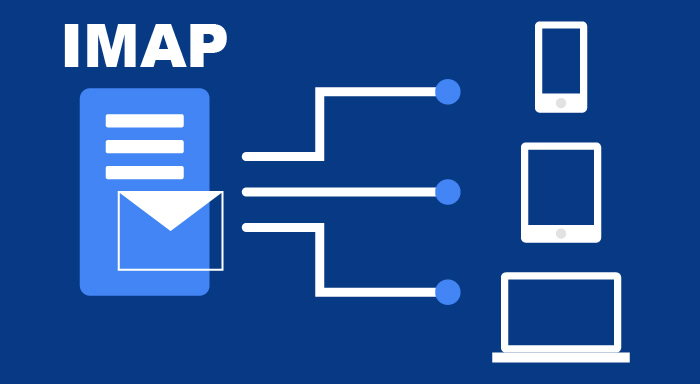
What is Imap? It is an abbreviation of a protocol called Internet Message Access Protocol, which has been considered as the backbone for email communication. Irrespective of whether you are scrolling through your emails on a computer, smartphone, or a mobile device, it is quite likely that you are using Imap without even knowing that you are using it. So, in this blog, let us dig deep on Imap. We will explore what Imap is, how it works, what are its benefits, and best practices of using it.
Before proceeding forward, you need to make sure that you are well-equipped with all the fundamental knowledge of what is email and how email works.
What Is Imap?
Internet Message Access Protocol, also called Imap, is a standard application layer protocol used for fetching incoming mails. It saves mail on a mail server and empowers recipients to see and modify them as if they were stored on their local device. It allows various email clients to retrieve and view messages over the TCP/IP connectivity.
Originally developed by Mark Crispin in 1980’s, it is also termed as interim mail access protocol, internet mail access protocol, and interactive mail access protocol. If it is authorized, it can get access to your emails irrespective of the device or location. Mainly, it is used in getting email from your email provider and transferring it to your email client (like PC or Mac).
How Imap Works?
In simple terms, for the incoming email, Imap works as a link between your email client and email server. Whenever users are accessing emails using Imap, they are basically reading them off the server. Users do not have to save or download the email on their local system. Since, Imap is not particularly connected to any specific device, users can access the services from different devices. Majorly they include:
- Laptop/Deskstop (Windows)
- Mac Computers
- Smartphone
- Smart Wearables
- Tablet
- Web interface
Working
Imap’s protocol is prevalently used and primarily follows the client-server architecture. It is basically a combination of server process and client operating on different computers connected within a network. It depends on TCP/IP connection for seamless communication. Once the communication has been established, the server by default connects to port 143, which is basically non-encrypted. However, if the user requires secure communication which is encrypted, port 993 is used.
Let us understand the working principle of Imap with the help of a few steps:
- When a user logs in to an email client, for example, Microsoft Outlook or Army 365 Webmail, the client communicates with the mail server via IMAP.
- The connection is established via a specific port.
- The email client shows all email headers.
- Only when the user clicks on the message, does the Imap download the message from the server and transfer it to the client. No automatic downloads of attachments happen.
- Users can track the message much more quickly with Imap than with other types of email retrieval protocols such as Post Office Protocol 3.
- All the email messages are retained on the server unless the user wishes to delete them.
How to Set Up IMAP in Your Email Client
Most email providers enable IMAP by default, but you may need to configure it manually while adding an email account.
Follow these basic steps:
- Open your preferred email client such as Microsoft Outlook, Thunderbird, Apple Mail, or another application.
- Choose Add Account or Email Settings.
- Enter your email address and password.
- Select IMAP as the account type instead of POP3.
- Enter the incoming mail server (IMAP server) details provided by your email provider.
- Use Port 993 with SSL/TLS for secure encrypted communication whenever available.
- Enter the outgoing SMTP server details.
- Save the settings and allow the client to synchronize your mailbox.
Once configured successfully, your emails, folders, and read/unread status will remain synchronized across all connected devices.
Tip: Always use SSL/TLS encryption to protect your email communication, especially when accessing your mailbox over public Wi-Fi networks.
What Are the Benefits of Imap?
Irrespective of whether you are using Imap for your software projects or for Gmail API, getting yourself familiar with Imap benefits is crucial:
Server-side Storage:
Since, all the mails are saved on the server-side, users do not need to download it on their local device. This advantage proves to be quite handy if your device encounters a security breach.
Optimized Consumption of Bandwidth:
As far as Imap is concerned, it only downloads the header from the email provider and not the entire message. So, if there is an email that you never open, its body and attachments remain on the server and will not be downloaded. Thus, it is a crucial process of saving bandwidth.
Seamless Management of Emails:
As previously stated, Imap empowers you to access your emails from any device and from any location. Moreover, you also have the option of creating folders and subfolders. Imap makes sure that users can access the message in a secure and easy manner.
Synchronization Across Numerous Devices:
Any modifications that you make on a single device, gets automatically updated on another device in real-time. For instance, if you choose to delete an email from your smartphone, it automatically gets updated on the client if you are accessing it via a desktop.
Compatibility with Various Clients:
These days most of the email apps such as Thunderbird, Gmail, and Microsoft Outlook provide support to Imap and its advanced functionalities. Thus, you can use it for multiple email providers with total flexibility and convenience.
Enhanced Security:
Usually, emails are transferred over secure connection encrypted effectively. So, Imap improves security irrespective of the fact that you are in a less-secure environment, i.e., you are using a public Wi-Fi network for instance.
IMAP vs POP3: What Is the Difference?
Many users confuse IMAP with POP3 because both are email retrieval protocols. However, they function differently and are designed for different use cases.
| Feature | IMAP | POP3 |
|---|---|---|
| Email Storage | Emails remain on the mail server | Emails are downloaded to the local device and may be removed from the server |
| Multi-device Access | Yes | Limited |
| Synchronization | Real-time synchronization across devices | No synchronization |
| Internet Connection | Usually required | Emails can be accessed offline after download |
| Best For | Personal and business users using multiple devices | Users who access email from a single device |
If you regularly switch between your laptop, smartphone, tablet, or webmail, IMAP is the better option because every action—reading, deleting, or organizing emails—is synchronized automatically.
POP3 is more suitable when you only use one device and prefer downloading emails for offline storage.
Conclusion
Imap is an integral element of a larger email infrastructure designed specifically for the purpose of delivering email securely to the recipient’s inbox. The blog introduces you to the fundamentals of Imap and specifically covers what is Imap?, how it works, and what are its key benefits. For more information on email solutions, differences between Imap and SMTP, etc., visit our website.
Frequently Asked Questions (FAQs)
What is IMAP used for?
IMAP (Internet Message Access Protocol) is used to retrieve and manage emails directly from a mail server. It allows users to access the same mailbox from multiple devices while keeping all emails synchronized.
Which port does IMAP use?
IMAP commonly uses:
- Port 143 for non-encrypted connections.
- Port 993 for secure SSL/TLS encrypted connections (recommended).
Is IMAP better than POP3?
For most users, yes. IMAP keeps emails stored on the server and synchronizes changes across multiple devices. POP3 downloads emails to a single device and offers limited synchronization.
Does IMAP delete emails from the server?
No. IMAP keeps emails on the mail server unless you intentionally delete them. Any changes you make—such as deleting, moving, or marking an email as read—are synchronized across all connected devices.
Is IMAP secure?
Yes, IMAP is secure when configured with SSL/TLS encryption using Port 993. This encrypts the communication between your email client and the mail server, helping protect your emails from unauthorized access during transmission.