











 Continue with Google

 Share on media

Do you want to know how to delete a Gmail account? The blog offers you a complete guide, with a step-by-step process of deleting a Gmail account.
Deleting a Gmail account simply means permanently removing the @gmail.com email address, which restricts the user from sending or receiving emails in the future. The process of deleting a Gmail account includes two main methods, which include deleting the Gmail account on a phone and deleting it on a desktop. Although Google offers around 30 days grade period to recover the deleted email address, it is not permanent. Deleting the Gmail account includes key aspects, like permanent address inactivation, irreversible erasure, and partial service loss. The user can also choose to remove the Gmail service from the overall Google Account or remove the account from any specific device.
Key Considerations Before Deleting a Gmail Account

Before deleting a Gmail account, it is essential to back up all the crucial data using Google Takeout. It is also important to update the email address linked to various key platforms, like bank accounts, social media, and subscriptions. Some of the key considerations before deleting a Gmail account are as follows:
- Backing Up Data: A Gmail account stores various important and sensitive data, like emails, contacts, calendars, and other key synced content. Deleting the account automatically deletes this data permanently, making it crucial to back up all the data before deleting the Gmail account. Users can use tools like Google Takeout to download all their essential data and store it securely.
- Update Linked Accounts: Before deleting a Gmail account, it is important to identify every service that is linked to that particular email account or uses the Gmail account for logins or passwords. Users can update this platform with newer email addresses.
- Confirm Recovery Information: It is also essential to ensure that the alternative email or phone number is updated before deleting the Gmail account.
How to Delete a Gmail Account
The process of deleting a Gmail account permanently removes all the emails and mail settings from the platform. There are two main methods of permanently deleting a Gmail account, which include deleting from a desktop and a phone. The process of deleting a Gmail account on an iPhone is similar to the process of deleting on a phone.
Method 1: Deleting a Gmail Account on a Desktop
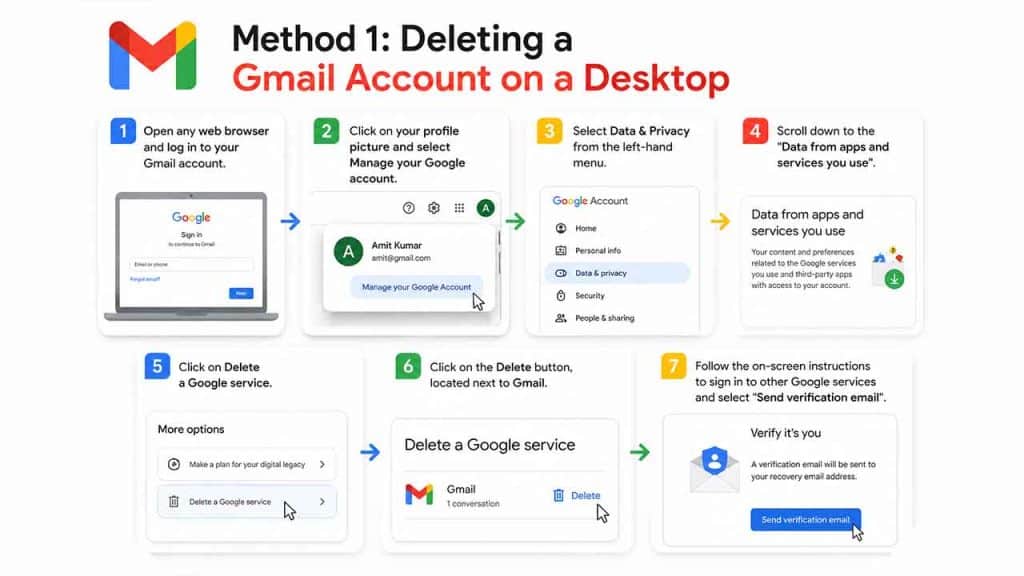
The process of deleting a Gmail account involves the following steps:
- Step 1: Open any web browser and log in to your Gmail account.
- Step 2: Click on your profile picture and select Manage your Google account.
- Step 3: Select Data & Privacy from the left-hand menu.
- Step 4: Scroll down to the “Data from apps and services you use“.
- Step 5: Click on Delete a Google service.
- Step 6: Click on the Delete button, located next to Gmail.
- Step 7: Follow the on-screen instructions to sign in to other Google services and select “Send verification email“.
Method 2: Deleting a Gmail Account on a Phone
To delete a Gmail account on a phone, you can follow the given steps:
- Step 1: Open the Gmail App on your mobile phone and tap on your profile picture in the top right.
- Step 2: Select Manage your Google Account.
- Step 3: Navigate to the Data & Privacy tab.
- Step 4: Scroll down to “More options” or “Data from apps and services you wish“.
- Step 5: Select Delete your Google Account.
- Step 6: Enter your password, review all the data, and confirm deletion by checking the boxes.
- Step 7: Finalize the deletion by tapping the Delete account.
Why Individual Delete a Gmail Account
There may be various reasons for people to delete a Gmail account, which often range from proactive security measures to reducing digital clutter and storage limitations. Some individuals also delete their Gmail accounts on impulse or evolving digital habits. Some of the major reasons for individuals to delete Gmail accounts permanently include:
- Privacy and Data Collection Issue: One of the major factors for deleting a Gmail account is the user’s concern over the amount of data collected by Google. From a Gmail account, Google generally collects extensive data like the content of the email, attachments, and metadata, often to offer personalized services and fight spam. The users often prefer to move to more privacy-oriented alternatives.
- Spam and Inbox Clutter: In Gmail, it is common for long-held accounts to accumulate excessive spam and phishing emails. These make the account unusable, prompting the users to delete and start fresh with a new account. To reduce the clutter, users can also mass delete emails on Gmail, along with unsubscribing from unwanted emails.
- Security Breaches: Another major factor for an individual to delete a Gmail account is a security breach or the account being hacked. To prevent any further unauthorized access, users generally choose to permanently delete their Gmail accounts. The user can also maintain the email security policy of Gmail by enabling built-in Google security features.
- Reducing Digital Footprint: The user can also be prompted to delete a Gmail account to remove personal information or to reduce their digital footprint.
- Storage Limitation: Limited storage also prompts users to delete the account. If the account is full, the users cannot send or receive any messages.
- Multiple Account Management: Sometimes, users create too many accounts for different purposes, which eventually leads to the deletion of the unnecessary accounts.
What Happens After Gmail Account Deletion
After deleting your Gmail account, it triggers permanent removal of all the associated emails, contacts, and other files in the drive after a short grace period. Access to various Google services, linked to the specific Gmail account, like YouTube and Google Play, is lost, and the email address cannot be used by anyone in the future.
After the deletion of the Gmail account, the user can no longer send or receive emails using the account. The email address becomes unusable. Although Google offers a grace period of around 30 days to restore or recover your deleted Gmail account.
Can You Recover a Deleted Gmail Account
After deleting a Gmail account, the users can recover the recover it within a short window of about 30 days. To attempt recovery, the users can follow the easy steps:
- Step 1: Visit the Google Account Recovery page.
- Step 2: Enter the recently deleted Gmail address and click Next.
- Step 3: If the account is recoverable, Google will ask you to follow the steps to confirm account recovery.
- Step 4: If successful, create a new password to recover the Gmail account.
Read More: How to Reset Your Password
Alternative to Deleting a Gmail Account
Instead of deleting a Gmail account, the user can opt for other alternatives, like removing the account from the device, setting up email forwarding, or cleaning up. Removing the Gmail account from the device is considered an ideal alternative to deleting the Gmail account, as it removes the account without permanently deleting the @gmail email address.
| Gmail Account Deletion | Gmail Removal/Sign-out | |
| What it do? | Permanently deletes the entire Gmail account using the @gmail email address. | Removes the Gmail account from a device, such as a phone or computer browser. |
| Impact | Users will be unable to use this address in the future. | Email, contacts, and settings remain safe. Accounts can be accessed through a web browser or another device. |
| Recovery | The recovery window is around 20 to 30 days. | Recovery is easy to re-sign into the account. |
Conclusion
Deleting a Gmail account is a significant process that permanently deletes the email address and all the crucial data associated with it. The process of deleting the Gmail account is straightforward and easy. There are two major steps to delete a Gmail account, which include deleting a desktop or a mobile device. It is also crucial to follow a few key steps to ensure your data and emails are backed up. Before deleting the Gmail address, you need to update all the linked accounts and ensure to have an alternative email address.
Frequently Asked Questions
Can I delete my Gmail account without deleting my Google Account?
Yes, you can delete your Gmail account without deleting the Google Account. By just deleting the Gmail account, the user can still use key services of Google, like YouTube and Google Drive, among others.
Can I recover my deleted Gmail account?
Google allows recovery of the Gmail account shortly after deletion in some cases, but it is not guaranteed. The recovery process depends on the total duration from the deletion of the Gmail account.
How long does it take to delete a Gmail account?
The process of deletion of a Gmail account is immediate after confirmation. Although the full removal of the data from Google’s server can take some time.
What will happen if someone sends an email to my deleted Gmail account address?
All the emails sent to a deleted Gmail address fail to deliver and bounce back to the sender.
Can I reuse my deleted Gmail email address?
No, after the deletion of the Gmail address, it cannot be recreated or reused in the future.