











 Continue with Google

 Share on media
The world of email communication has become a crucial part of academic, government, and professional applications. There are numerous email services designed for college or university environments with robust security, collaboration, and integration with e-learning platforms. GatorMail is also the official email service of the University of Florida community. The academic mailbox system is widely used across the University of Florida for official communication. The platform also offers various additional key features like cloud storage, calendar integration, and built-in productivity tools.
Quick Overview of GatorMail
| Feature | Details |
|---|---|
| Platform | Built on Microsoft 365 |
| Storage | Up to 100 GB mailbox |
| Security | Duo MFA and advanced spam filtering (Proofpoint) |
| Access | Web browser, mobile devices, and Outlook app |
What is GatorMail?
Built on Microsoft 365, GatorMail is the designated email & calendaring system of the University of Florida, which is designed for its students, faculty, and staff members. The platform provides a secure and holistic place to send and receive emails, save essential documents, and seamlessly collaborate with everyone on campus. The academic mailbox system allows users to leverage a global address directory, calendar accessibility, and ancillary services like spam filtering and SMTP via Proofpoint.
Benefits of GatorMails:
UF email system is primarily renowned as the official and secure email system of the University of Florida. The platform offers high-level security, along with protections against phishing and spam filters. Some of the other key benefits of the UF email system are as follows:
- Secure Communication: GatorMail features advanced technology that blocks over 98% of the harmful emails. This offers a safer environment for the users to safely communicate with each other.
- Official Credentials: The university email provides a reputable “.ufl.edu” email address, which is essential for academic, professional, and internal UF communications.
- Enhanced Protection: The University of Florida email is integrated with Duo Mobile MFA, which offers improved security against unauthorized access.
Who Can Use GatorMail? (Eligibility Explained)
GatorMail is an official email service provided by the University of Florida, and it is only available to members of the university community.
Students
All enrolled students at the University of Florida receive a GatorMail account. This email is used for important academic communication, including course updates, announcements, and university notifications.
Faculty and Staff
Faculty members and university staff are also provided with academic mailbox system accounts. These accounts are used for internal communication, collaboration, and administrative purposes across departments.
Alumni (After Graduation)
University of Florida email access does not end immediately after graduation. Students can continue using their account for a limited period.
- In most cases, access remains active for up to 365 days after graduation
- After this period, the account may be deactivated automatically
Important Note
GatorMail is not a public email service. You cannot create an account unless you are officially associated with the University of Florida.
Essential Features and Characteristics
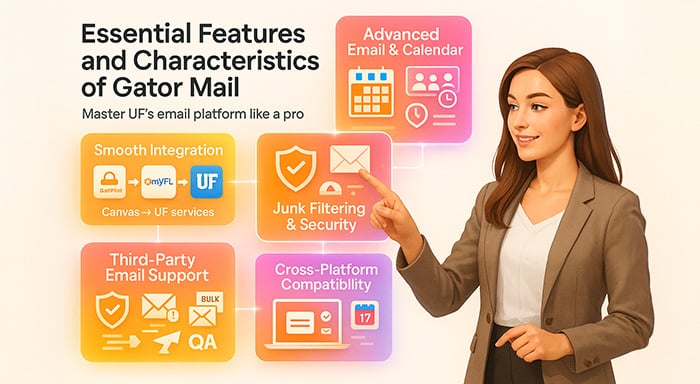
GatorMail involves various key features that go beyond simple email tools. In the UF email system, users get a comprehensive suite of multiple built-in tools, which help the user manage and control communication at the university. Some of the essential features of the University of Florida email are as follows:
Smooth Integration with Different Campus Needs
The way UF email system is directly into the GatorLink login system is one of the smartest, most effective benefits of the platform. This eliminates the need to struggle with usernames and passwords to access different university services. The smooth integration of GatorLink credentials uncovers Canvas, myUFL, and other e-learning platforms.
Advanced Email and Calendar integration Support
Comprehensive email tools with calendar integration and global address books help GatorMail deliver an intuitive user experience. The calendar support is specifically used for scheduling study sessions, group meetings, and priority tasks. Additionally, you can monitor office timings, coordinate calendars with classmates, and manage deadlines. Meanwhile, global address books are used to find and share contact details with other UF community members.
Robust Junk Filtering and Email Security Practices
The University of Florida (UF) has a vast information system; securing it with robust security practice implementation is essential. GatorMail’s security system disables hundreds of thousands of malicious emails every year to safeguard its inbox. They leverage Proofpoint, an advanced filtering system, and two-factor authentication to prevent phishing attacks and email-based threats.
Sending Encrypted Email
In GatorMail, users can share encrypted files with other users. The user can share encrypted files with both external and internal recipients. If the email is sent to an external recipient (non-Microsoft account), the recipient will receive a link to open the message, along with a one-time passcode to verify their identity. Whereas in the case of an internal recipient, the messages are automatically secured. In an internal email, encryption only acts as an added security.
The process of sending encrypted emails in the academic mailbox system is similar to sending encrypted emails in Outlook, as GatorMail is built on Microsoft 365.
Third-Party Email Services Support
GatorMail uses domain authentication via DKIM (Domain Keys Identified Mail) to streamline departmental communication and marketing campaigns. This robust feature enables big email service providers to send bulk messages via their @ufl.edu address without worrying about getting flagged. Whether it’s the academic domain, the student hub, or research groups, the platform is a go-to solution to meet broader audiences professionally.
Compatibility Across Different Platforms
Its multi-platform accessibility allows you to access GatorMail via web browsers and Microsoft Outlook across Windows, iOS, and Android. With this feature, you’re not only limited to a specific way to check emails, instead you can use a laptop, phone, or tablet. This flexibility doesn’t affect the synchronization between messages, contacts, and calendar across the devices you use.
GatorMail Settings and Configuration Guide
After logging into GatorMail, users can customize their email settings to improve productivity and manage communication more efficiently. Here are some important configurations you should know:
1. Set Up Email Forwarding
If you prefer using another email (like Gmail), you can forward your GatorMail emails automatically.
How to do it:
- Go to Settings in Outlook Web App
- Select Mail > Forwarding
- Enter your personal email address
- Save changes
This ensures you never miss important university emails.
2. Create an Email Signature
A professional email signature is useful for academic and official communication.
How to do it:
- Go to Settings > Mail > Compose and Reply
- Add your name, course, or department
- Save your signature
This makes your emails look more professional.
3. Manage Storage Space
UF email system offers large storage, but it can fill up over time.
Tips to manage storage:
- Delete unnecessary emails regularly
- Empty the “Deleted Items” folder
- Remove large attachments
Helps keep your inbox fast and organized.
4. Organize Inbox with Folders and Rules
You can automatically sort emails into folders using rules.
How to do it:
- Create folders for subjects (e.g., Classes, Admin, Personal)
- Set rules to move emails automatically
- Mark important emails as priority
This saves time and keeps your inbox clean.
Pro Tip
Using these settings can make GatorMail much easier to manage, especially if you receive a high volume of academic emails daily.
Best Practices for Using GatorMail
To get the most out of GatorMail and keep your account secure, it’s important to follow some basic email safety and management practices. These help improve both security and productivity.
1. Be Aware of Phishing Emails
Always be cautious of suspicious emails asking for personal information or login details. Avoid clicking unknown links or downloading attachments from untrusted sources. If you’re unsure about an email’s safety, you can verify it using an email spam checker to detect potential phishing or malicious content before interacting with it.
2. Use a Strong Password
Create a strong password for your GatorLink account that includes a mix of letters, numbers, and symbols. Avoid using easily guessable information like your name or birthdate.
3. Organize Your Inbox
Use folders, labels, and rules to keep your inbox organized. This helps you quickly find important academic emails and reduces clutter.
4. Clean Your Storage Regularly
Delete unnecessary emails, especially those with large attachments. Also, empty your deleted items folder to free up storage space.
Pro Tip
Following these practices not only keeps your GatorMail account secure but also ensures smooth and efficient communication throughout your academic journey.
How to Access GatorMail
There are three major steps to access the UF email system, which include using a web browser, using the Outlook app, and using a mobile setup. You can also access the GatorMail Professional Email by simply signing in at mail.ufl.edu and navigating to Dashboard > Website > Email. Similarly, to access the University of Florida email, you can go to uhd.edu/gatormail and select O365-Student Login.
How to Access GatorMail using a Web Browser:
To access GatorMail using a web browser, you need to navigate to mail.ufl.edu and log in to GatorMail. The step-by-step guide for the following includes:
- Step 1: Open the web browser of your choice and go to mail.ufl.edu.
- Step 2: Select “Log in to GatorMail” and enter your GatorLink username and password.
- Step 3: Complete the Duo two-factor authentication process.
- Step 4: You will be forwarded to the Outlook Web App interface, where you can access the email from your university email.
How to Access GatorMail using a Mobile Device:
You can add the GatorMail to the Outlook app on your mobile device to access it on a mobile device. You can also use the browser of your mobile phone to log in directly to the mail.ufl.edu, to access your Outlook-based UF mail system.
The steps to access UF Outlook email via mobile device are as follows:
Using the Native Mail App:
- iPhone/iPad
- Step 1: Navigate to Settings > Mail > Accounts > Add Account.
- Step 2: Select Exchange and enter your GatorMail email address and password.
- Step 3: Click Save.
- Android
- Step 1: Open the Gmail App.
- Step 2: Go to Menu > Settings > Add Account > Exchange and Office 365.
- Step 3: Enter your credentials and accept security settings.
How to Access the UF email system using an Outlook App:
- Using the Outlook App for Mobile Device:
- Step 1: Download and install the Microsoft Outlook App.
- Step 2: Open the app and go to Add Account.
- Step 3: Enter your UF email address and password.
- Step 4: Complete the two-factor authentication to access the emails.
- Using Outlook App for Windows/Mac:
- Step 1: Open Outlook.
- Step 2: Click on File > Add Account.
- Step 3: Enter your UFL username and click on Connect.
- Step 4: Enter your password.
- Step 5: Complete the Duo authentication prompt to access your UF email system.
GatorMail Login Problems and Solutions (With Quick Fixes)
Even though GatorMail is a reliable email system, users may occasionally face login issues—especially during busy academic periods. These problems are usually easy to fix if you know the cause.
Below are the most common UF email login issues along with practical solutions:
1. Incorrect Password or Locked Account
One of the most frequent issues is entering the wrong GatorLink credentials multiple times, which may temporarily lock your account.
How to fix:
- Reset your password through the GatorLink portal
- Make sure Caps Lock is off while typing
- Wait a few minutes before trying again after multiple failed attempts
2. Duo Multi-Factor Authentication (MFA) Not Working
University email requires Duo Mobile authentication, which may fail due to device issues or connectivity problems.
How to fix:
- Check your internet connection
- Ensure your Duo Mobile app is updated
- Try using an alternate verification method (SMS or passcode)
- Re-sync your device with Duo if needed
3. Browser Compatibility or Cache Issues
Sometimes GatorMail may not load properly due to outdated browsers or corrupted cache data.
How to fix:
- Clear your browser cache and cookies
- Try accessing the UF email system in a different browser (Chrome, Edge, or Firefox)
- Disable unnecessary extensions that may interfere with login
4. Outlook Not Syncing with GatorMail
Users accessing GatorMail through Outlook may experience syncing delays or login errors.
How to fix:
- Remove and re-add your university email account in Outlook
- Ensure your Outlook app is updated
- Check your internet connection and account settings
- Restart the Outlook application
5. Account Access Expired or Disabled
Students or staff who are no longer active may lose access to their GatorMail account.
How to fix:
- Confirm your account status with the university
- Contact UF IT support if you believe access was removed incorrectly
Pro Tip
To avoid frequent login issues, always keep your credentials secure, enable proper authentication methods, and regularly update your apps and browser.
GatorMail vs Other University Email Systems
GatorMail is not a standalone email platform, it is built on Microsoft 365 and customized specifically for the University of Florida. Unlike general email services, the Outlook-based UF mail system is designed to support academic workflows, campus security, and student collaboration.
To better understand its value, here’s how the UF email system compares with other commonly used university email systems:
Key Differences at a Glance
| Feature | GatorMail (UF) | Google Workspace (Other Universities) | Standard Outlook (General Use) |
|---|---|---|---|
| Platform | Microsoft 365 (Customized) | Google Workspace | Microsoft Outlook |
| Integration | Deep integration with UF tools (Canvas, myUFL) | Limited to Google apps | No university-specific integration |
| Security | Duo MFA + Proofpoint filtering | Google security features | Basic Microsoft security |
| Storage | ~100 GB mailbox | Usually 15–30 GB (varies) | Depends on subscription |
| Use Case | Academic & institutional communication | Academic (varies by university) | Personal / business use |
What Makes GatorMail Different?
1. Built for the University Ecosystem
GatorMail is tightly integrated with UF systems like Canvas and myUFL, making it easier for students and staff to manage academic communication in one place.
2. Enhanced Security for Academic Use
With Duo multi-factor authentication and advanced filtering (Proofpoint), GatorMail offers strong protection against phishing and unauthorized access.
3. Powered by Microsoft 365
Since it runs on Microsoft 365, users can access tools like Word, Excel, PowerPoint, and Teams for collaboration and productivity.
Read More: Google Workspace vs Microsoft 365
Conclusion
GatorMail, developed by the University of Florida, is a secure and crucial email platform designed for the students, faculty, and staff members of the University of Florida. The Outlook-based UF mail system can block over 98% of the harmful emails, along with providing a reputable “.ufl.edu.” email address to its users. The user can also access their UF email system using various methods, like a web browser, a mobile device, or by using an Outlook app. It is also a cost-saving email service, which features a dedicated email management dashboard and offers professional email with a domain, without a high-priced enterprise license.
Frequently Asked Questions
Is GatorMail secure?
Yes, the Outlook-based UF mail system is generally a secure email platform, which is protected by the University of Florida Information Technology (UFIT) standards. It also includes mandatory Duo Mobile multi-factor authentication (MFA), along with robust phishing/malware filters.
Can I send encrypted emails using GatorMail?
Yes, you can send encrypted emails using GatorMail by utilizing the built-in Microsoft 365 encryption features. The Microsoft 365 encryption system allows users to securely transfer sensitive data to both internal and external recipients.
What is GatorLink?
GatorLink is the official, individual computer network identity for the students, faculty, and staff at the University of Florida. GatorLink serves as a single sign-on username and password to access essential services like UF Cloud, VPN, and Canvas, among others.
What is the storage limit in GatorMail?
University email offers a total of 100 GB of storage for staff and students. The limit for the shared mailbox in GatorMail is 50GB, with individual message size limited at 35 MB, including attachments.
How long does the GatorMail account stay active?
The GatorMail accounts for the students generally stay active for about 365 days after their graduation or after not registering for a class. For faculty and staff members of the University of Florida, the university email accounts stay active for 30 days following their last day of employment.