











 Continue with Google

 Share on media
Email marketing remains one of the most reliable ways to reach people, build real relationships, and drive conversions — but only if your emails actually land in the inbox. That’s where a lot of businesses start quietly to lose focus. You spend time crafting a campaign, hit send, and then wonder why the numbers look so flat. More often than not, the emails are sitting in spam folders.
And the frustrating part? Most senders don’t even realize it’s happening. Today’s spam filters aren’t the blunt instruments they used to be. Gmail, Outlook, Yahoo — they’re all running sophisticated systems that weigh dozens of signals before deciding where your email ends up. Sender reputation, authentication, how your content reads, whether people actually engage with your stuff — it all counts.
So in this guide, we’ll break down why emails go to spam, how these filters actually make decisions, and what you can do to fix it.
What Exactly Is a Spam Filter?
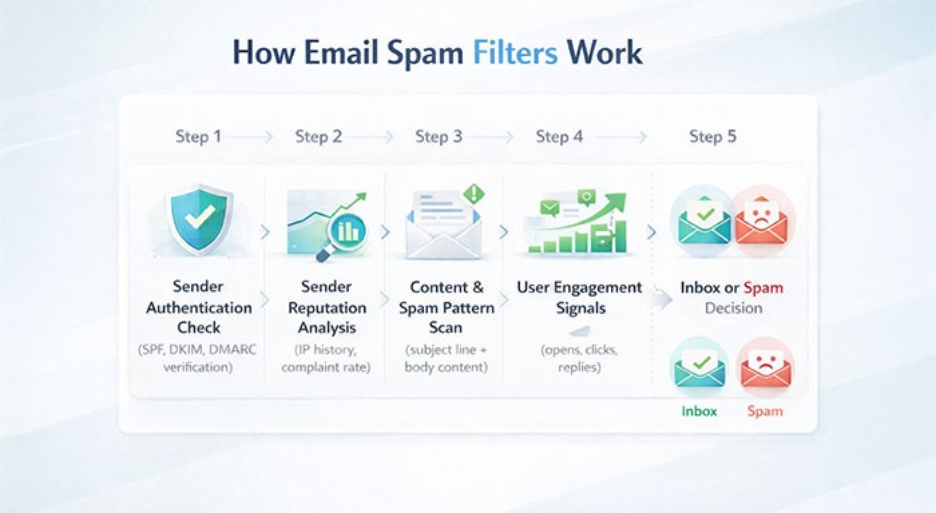
At its core, a spam filter is the gatekeeper between your email and someone’s inbox. Every email service provider runs one, and they’re constantly analyzing incoming messages for anything that looks off — suspicious senders, shady content, low engagement history, missing authentication.
The original purpose was simple: keep phishing scams and malware away from users. But modern filters have gotten smart enough that even well-intentioned marketing emails can get caught in the net. That’s why understanding why emails go to spam is not optional anymore — it’s a basic requirement for anyone doing email marketing seriously.
Why Emails Go to Spam: 10 Common Reasons
Here’s where most deliverability problems actually come from.
1. Missing Email Authentication (SPF, DKIM, DMARC)
If your domain isn’t properly authenticated, mailbox providers have no real way of knowing whether you’re actually who you say you are. The three protocols that matter most are:
- SPF (Sender Policy Framework): Tells receiving servers which IPs are authorized to send on your behalf
- DKIM (DomainKeys Identified Mail): Adds a digital signature to verify the message wasn’t altered in transit
- DMARC: Wraps both together and tells providers what to do if something doesn’t check out
Skip these, and your emails look suspicious by default. Fix: Set up SPF, DKIM, and DMARC through your domain’s DNS settings — most hosting providers walk you through this.
2. Poor Sender Reputation
Think of your sender reputation like a credit score — except it affects whether your emails reach people instead of whether you get a loan. It takes time to build and not long to damage. Things that bring it down fast:
- Spike in bounce rates
- A wave of spam complaints
- Sending to addresses that haven’t engaged in months
- Emailing invalid or dead addresses
The fix is less glamorous than people expect: keep your list clean, monitor your metrics, and don’t blast people who clearly don’t want to hear from you.
3. Sending to Purchased or Unverified Lists
The fastest way to understand why emails go to spam: Bought lists that are a shortcut but almost always backfires. The people on them never asked to hear from you, so they’re far more likely to hit “mark as spam” than actually read what you sent. A handful of those complaints can snowball quickly and tank your reputation with major providers.
Always send to people who opted in willingly — and if you really want to be thorough, double opt-in ensures they meant it.
4. Spam-Triggering Content
Spam filters have seen every trick in the book, and they’re trained to catch patterns that scream “promotional garbage.” A few things that set them off:
- ALL CAPS in the subject line
- Strings of exclamation marks!!!
- Subject lines that overpromise or mislead
- Classic spam phrases like “FREE offer” or “Act now before it’s too late”
Just write like a normal person. If your subject line sounds like something you’d roll your eyes at in your own inbox, rewrite it.
5. High Bounce Rates
Every time an email can’t be delivered, it’s logged. There are two kinds:
- Hard bounces – the address flat-out doesn’t exist or has been deactivated
- Soft bounces – temporary issues like a full inbox or server hiccup
Hard bounces are the ones that really hurt. A high rate tells providers your list is poorly maintained — and that’s a reputation hit you don’t want. Clean your list regularly, not just when something goes wrong.
6. Low Engagement
Deliverability isn’t just about getting past the filter once — it’s about your track record over time. If people consistently ignore your emails, delete them without opening, or worse, report them, providers start routing your messages away from the inbox. The fix isn’t a technical one: it’s sending better, more relevant content to the right people. Segmentation goes a long way here.
7. Inconsistent Sending Patterns
Going quiet for weeks and then dumping a massive campaign on your list is a main reason why emails go to spam. It mimics what compromised or spammy accounts tend to do. Providers prefer senders who show up consistently. Build a regular cadence, and if you’re scaling up your volume, do it gradually rather than all at once.
8. Blacklisted IP Address
Landing on a spam blacklist is one of the more serious deliverability problems — and it can happen even if you’re doing everything else right, especially on shared IPs. Common causes:
- High spam complaint volumes
- Sending patterns that look like bulk spam
- A domain with a troubled history
Check your sending IP and domain against blacklists regularly. If you’re on one, your email provider can usually help you figure out next steps.
9. Poor Email Design or Formatting
A badly built email doesn’t just look unprofessional — it can get you flagged. Filters pick up on things like:
- Heavy image load with almost no text
- Sloppy or broken HTML
- An unusually high number of links, especially shortened ones
Keep your design clean, balance your text and images, and always send a test before you go live.
10. Missing Unsubscribe Link or Compliance Gaps
This is one of the key reasons that throws plenty of senders in a loop. Laws like CAN-SPAM demonstrate clear requirements, which emphasizes that every email needs to have:
- Honest, accurate sender information
- A real physical address
- A functioning unsubscribe link
Skip any of these and you’re not just risking spam filters — you’re risking legal compliance too. For a deeper breakdown, check out our guide on CAN-SPAM Explained.
How to Actually Fix Deliverability Issues
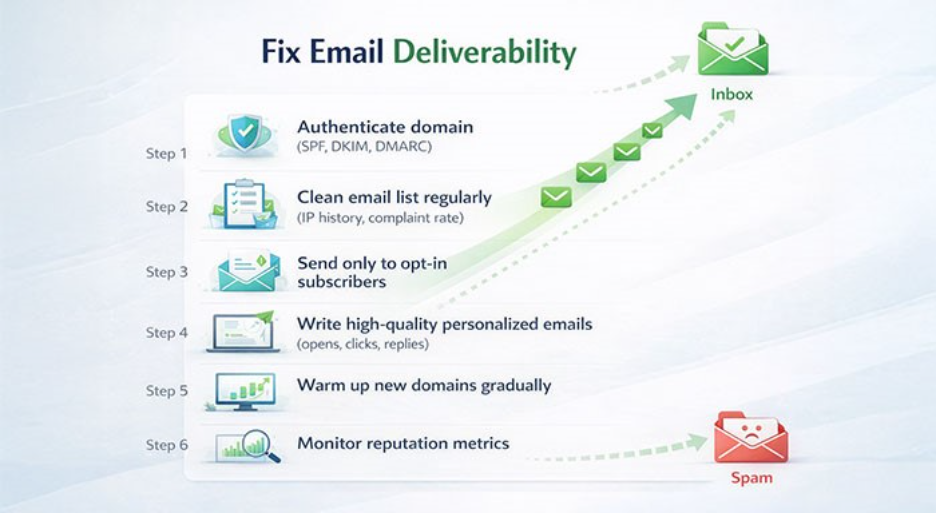
After knowing why emails go to spam folders, it’s time to see proactive steps to prevent this. Here are some practices listed which used to prevent emails to go to spam folder:
Get your authentication sorted first: SPF, DKIM, and DMARC should be the starting point for any deliverability audit. Without them, everything else you do is working against a headwind.
Clean your list frequently: Remove hard bounces immediately, cut inactive subscribers on a rolling basis, and stop treating list size like a vanity metric. Engagement rate matters far more.
Only email people who asked to hear from you: It sounds obvious, but it’s where a lot of businesses quietly cut corners. Bought lists, scraped addresses, or contacts added without clear consent will hurt you more than they’ll ever help.
Write high-quality emails: Personalize where you can, keep subject lines honest, and focus on what the reader actually gets out of it. Better content drives better engagement, and better engagement signals to providers that your emails belong in the inbox.
Take new domains slowly: A fresh domain has zero reputation — you have to earn it. Start with small sends to your most engaged contacts, then scale up as your track record builds.
Keep an eye on your reputation metrics: Don’t wait for a deliverability crisis to start monitoring. Track complaint rates, bounce rates, and domain reputation regularly so you can catch problems while they’re still small.
Final Thoughts
Comprehending why emails go to spam is crucial for any business running email marketing campaigns. Spam filters analyze a combination of factors, such as sender reputation, authentication, content quality, and engagement signals, where each one matters. Using an email spam checker can help identify potential issues in your emails before they reach recipients’ inboxes.
Most deliverability issues are solvable by following established best practices: verify your domain, keep your list clean, send emails only to people who opted in, and focus on creating high-quality content that’s actually worth reading. If fixes are implemented correctly, email marketing becomes one of the most trusted and affordable channels available for connecting with customers and generating leads.
FAQs
Why emails go to spam instead of the inbox?
Emails usually land in spam folder due to poor sender reputation, spam-triggering content, missing authentication information, or repeatedly low engagement from recipients.
How do email spam filters work?
Spam filters are used to analyze a range of factors, including sender reputation, authentication protocols, content patterns, and recipient behavior, to understand whether a message should be delivered to the inbox or filtered out.
Why do marketing emails go to spam more often?
Marketing emails are more likely to be marked spam because they’re sent in bulk, often written in promotional language, and are sometimes sent to recipients who didn’t explicitly opt in.
How can I fix my email deliverability issue?
Simply authenticate your domain, maintain a clean and engaged list, write relevant content, and monitor your sender’s reputation frequently.
Can spam filters block legitimate emails?
Yes. Even trusted emails can be flagged if they contain spammy language, come from a low-reputation domain, or lack proper authentication data.