










 Continue with Google

 Share on media
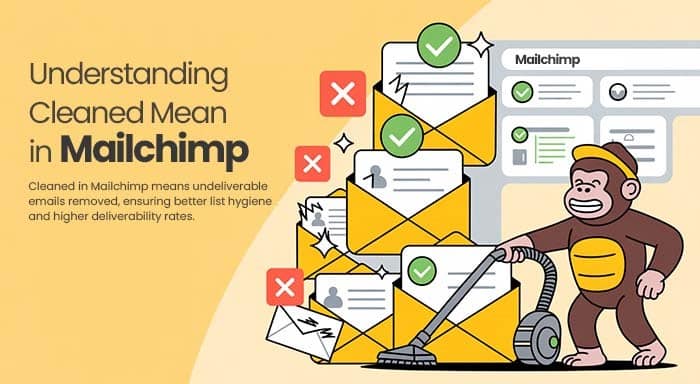
If you are a marketing professional so it becomes very crucial for you to know about what does Cleaned Mean in Mailchimp. With the monitoring of your cleaned contacts, bounce pattern analysis, and adherence to proper list hygiene procedures, you can have good email campaigns with improved deliverability rates.
In this blog, we will explore everything you need to know about cleaned emails in Mailchimp, why it is important and how it can impact your email marketing strategy.
Remember, quality prevails over quantity when it comes to email marketing- a smaller list of active subscribers will always perform better than a large list full of invalid or unresponsive addresses.
What Does Cleaned Mean in Mailchimp?
A clean contact in Mailchimp is an email address that is automatically deleted from your active mailing list since it is unreachable. They have email addresses that have hard-bounced or soft-bounced multiple times, making it impossible for them to receive further emails from your campaign. When Mailchimp tags a contact as “cleaned” it flags the email address as undeliverable because of recurring problems. From then on, Mailchimp ceased to send out emails to it to avoid further issues. This boosts your sender’s reputation, protection, and overall deliverability rates.
Let’s learn more about these terms:
Hard Bounces:
A hard bounce occurs when an email sent to a subscriber’s address is permanently rejected by the receiving server. Some of the reasons for hard bounce are:
The email address is invalid, misspelt, or simply does not exist.
The domain name is fictitious and not registered.
There are server-side bans or filters that prevent messages from unknown senders or IP addresses.
Soft Bounces
A soft bounce happens when an email is briefly rejected due to reasons that can be fixed later. Some typical causes of soft bounces are:
The inbox of the recipient is full and can’t take more messages at the moment
There are some short-term problems with the receiving server, network, or DNS settings
The receiving server is temporarily overburdened by too much traffic.
A gentle bounce indicates that Mailchimp will continue to attempt to deliver the email for a few days before cleaning up the subscriber’s address. If the address continues to soft bounce during this period, Mailchimp will ultimately flag it as clean.
Spam Complaints
Another method through which the subscribers can get cleaned out is if they keep marking your messages as spam on multiple occasions. When there are too many complaints from a single email address, Mailchimp will clear it up to avoid further problems.
So, in brief, “cleaned” means addresses that have once hard bounced, consistently soft bounced over time, or gotten multiple spam complaints. Mailchimp software actively cleans these addresses to preserve your sender’s reputation and overall deliverability.
Best Practices to Prevent Cleaned Contacts
Preventing cleaned contacts is much easier than trying to recover from poor email deliverability later. Maintaining a healthy email list helps improve open rates, reduce bounce rates, and protect your sender reputation over time.
Here are some effective ways to prevent contacts from getting cleaned in Mailchimp:
Use Double Opt-In Forms
Double opt-in requires subscribers to confirm their email address before joining your list. This helps ensure that only real and valid users are added to your audience.
Verify Email Addresses Before Importing
Always validate email lists before importing them into Mailchimp. Invalid or outdated addresses can quickly increase your bounce rate and harm deliverability.
Avoid Purchased Email Lists
Buying email lists often leads to spam complaints, fake addresses, and poor engagement. Focus on building an organic audience that genuinely wants to hear from you.
Regularly Remove Inactive Subscribers
Subscribers who never open or interact with your emails can negatively affect engagement metrics. Cleaning inactive contacts regularly keeps your list healthier and more responsive.
Send Consistent and Relevant Content
Sending useful, personalized, and consistent emails encourages engagement and reduces the chances of subscribers ignoring or reporting your emails as spam.
Many email marketing platforms such as MailerLite and Mailchimp offer advanced list-cleaning, automation, and subscriber management features that help businesses maintain healthier email lists and improve campaign performance.
How may having too many clean contacts harm your email marketing?
Now that we have learned about how email addresses get cleaned out in Mailchimp, you might be thinking – Should you worry if your list is full of them? Let’s talk about how a high cleaning rate can affect your email marketing.
Reduced email reach and a weakened sender reputation
One of the largest dangers of having numerous cleaned contacts is lower email deliverability and a damaged sender reputation.
Mail providers such as Gmail utilize advanced algorithms in deciding whether an email is spam or not. One such factor they consider is the reputation of the sender, which relies partially on their bounce rate.
If more than 2-5% of your emails bounce, ISPs will suspect your domain of transmitting spam. This can lead to emails being sent directly to spam folders or blocked altogether.
Most cleaned contacts artificially inflated your bounce rate, which means you are telling ISPs that your emails are not of quality and are not reaching actual inboxes. This harms your domain’s reputation and deliverability.
Reduce engagement rates
Too many clean contacts also result in lower open and engagement rates.
When you are emailing a list of inactive or invalid addresses that will never open and click, it distorts your metrics.
Your overall open and click-through rates will be lower than if you had only emailed actual active subscribers.
Low engagement rates also appear suspicious to ISPs, which may exacerbate any deliverability problems. It is a flag that your emails are not relevant to recipients.
Wastage of time, money, and lower returns on investment
From a business standpoint, cleaned contacts waste time and resources spent on emailing addresses that no longer work.
Creating email campaigns, sending messages, and analyzing stats takes effort. But if you are spending that time emailing fake or invalid addresses, it is wasted energy that provides no return on investment.
Sending to engaged subscribers has a payback via purchases, conversions, etc., whereas sending to cleaned contacts does not. It lowers the aggregate return on investment of your email marketing efforts.
Viewing and Managing Cleaned Contacts
Mailchimp offers many options for managing your cleaned contacts:
- Go to the dashboard of your audience
- Select “View contacts”
- To show only “Cleaned” contacts, use the filter option
- Review the list to understand which addresses have been removed
Difference Between Cleaned, Subscribed, and Unsubscribed Contacts
Many Mailchimp users often confuse cleaned contacts with unsubscribed contacts, but both are completely different statuses inside your audience dashboard.
Understanding these contact types helps you manage your email list more effectively:
Subscribed Contacts
Subscribed contacts are active users who have given permission to receive your emails. These contacts can receive campaigns, automation emails, newsletters, and promotional updates.
Unsubscribed Contacts
Unsubscribed contacts are users who manually opted out of your emails. They are still stored in your audience list, but Mailchimp will no longer send marketing emails to them unless they subscribe again.
Cleaned Contacts
Cleaned contacts are email addresses that Mailchimp automatically removes from active sending due to repeated hard bounces, continuous soft bounces, or spam complaints. These contacts become undeliverable and cannot receive future emails.
In simple terms:
- Subscribed = Active audience
- Unsubscribed = User opted out
- Cleaned = Invalid or unreachable email address
Knowing the difference between these statuses can help you maintain better list hygiene and improve overall email marketing performance.
Exporting Cleaned Data
You can export your sanitized contacts to review patterns or try to contact these subscribers via other channels. You can use this data to determine flaws in your data gathering techniques or email validation processes.
Archiving vs. Deleting
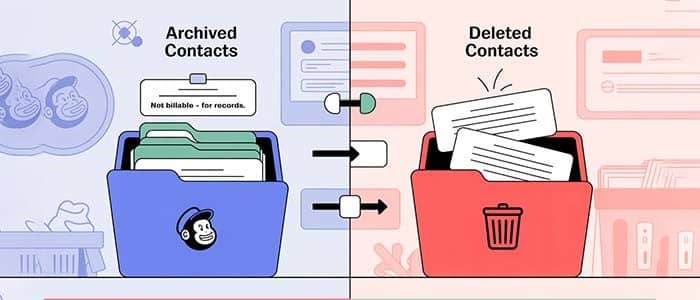
Mailchimp has a feature to archive cleaned contacts instead of deleting them permanently. Archiving maintains the contact information but excludes it from your billable number of contacts, which comes in handy for record keeping.
Tips to Improve Email Deliverability After Cleaning Contacts
After removing cleaned contacts from your audience, the next step is improving your email deliverability and rebuilding a strong sender reputation. A cleaner list allows your emails to reach more inboxes instead of spam folders.
Here are some practical ways to improve email deliverability:
Warm Up Your Email Domain
If your engagement rates have dropped, start by sending emails gradually to your most active subscribers. This helps rebuild trust with email service providers.
Segment Your Active Subscribers
Divide your audience based on engagement, interests, or activity levels. Sending targeted emails improves open rates and reduces spam complaints.
Write Better Subject Lines
Clear, relevant, and non-spammy subject lines encourage users to open your emails and improve overall campaign performance.
Avoid Spam Trigger Words
Overusing words like “Free,” “Guaranteed,” or excessive capital letters may trigger spam filters. Keep your messaging natural and professional.
Monitor Bounce and Complaint Rates
Regularly tracking bounce rates and spam complaints helps identify problems early before they damage your sender reputation.
Use Email Verification Tools
Using email verification and list-cleaning tools can help identify invalid or risky email addresses before sending campaigns. Platforms like Extract Mails help businesses maintain cleaner contact lists and improve email marketing efficiency.
A healthy email list combined with strong engagement practices can significantly improve inbox placement and overall campaign success.
Conclusion
Cleaning cleaned contacts in Mailchimp is not about technical tidying up- it is about making real connections with a real audience that actually cares about hearing from you. It can be frustrating to watch contacts get deleted from your list, but keep this in mind it is important to clean your contacts in order to safeguard your reputation and to know what really counts. It enables you to connect with subscribers who are really passionate about your content. Instead of hunting numbers, spend your time and energy crafting useful emails for engaged subscribers. Tools like Extract Mails can help streamline this process by identifying and managing valid email contacts more efficiently, ensuring your communication efforts are focused on quality over quantity.
FAQs
Can I recover cleaned contacts in Mailchimp?
No, cleaned contacts cannot receive emails again unless the email address becomes valid and is manually re-added after verification.
Does Mailchimp charge for cleaned contacts?
Mailchimp generally does not count archived cleaned contacts toward billing, but active audience limits may vary depending on your plan.
What is considered a high bounce rate in email marketing?
A bounce rate above 2%–5% is usually considered risky and may negatively affect email deliverability and sender reputation.
Should I delete or archive cleaned contacts?
Archiving is often better because it keeps historical data while removing the contacts from active campaigns.
How can I reduce cleaned contacts in the future?
You can reduce cleaned contacts by using double opt-ins, validating email addresses regularly, avoiding purchased lists, and sending emails only to engaged subscribers.