
 Continue with Google

 Share on media
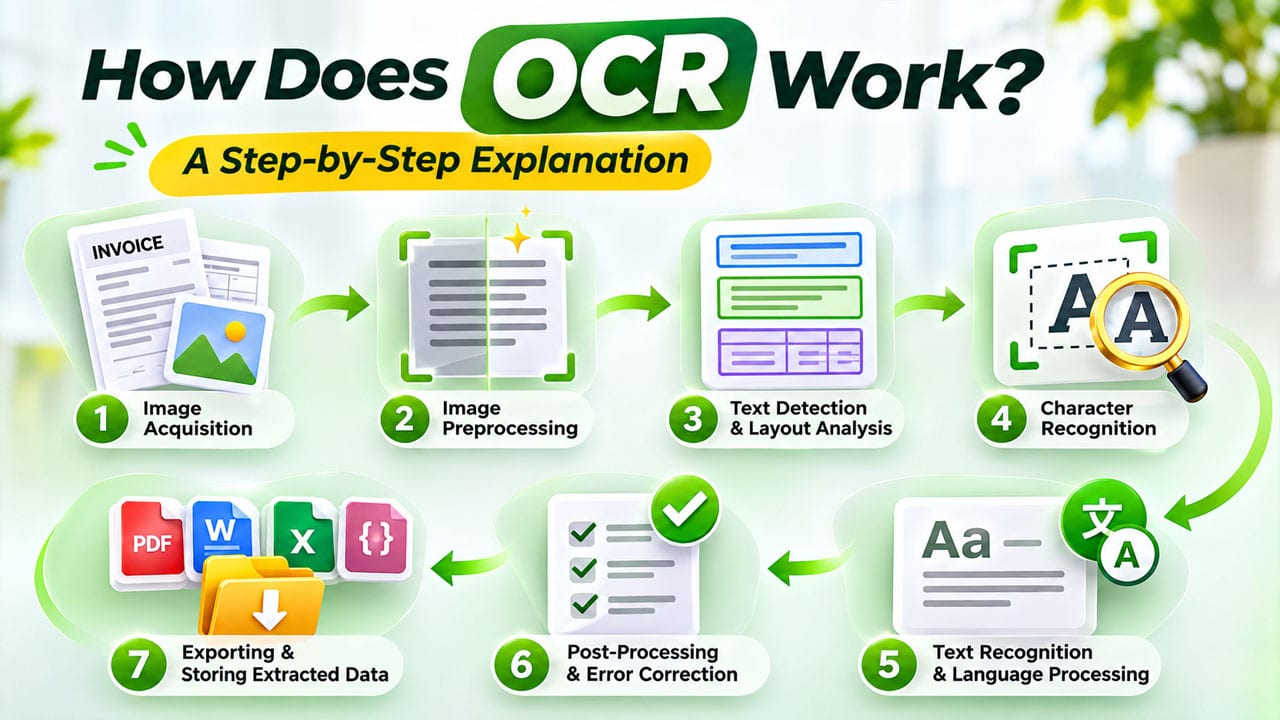
Every day, businesses handle thousands of documents, including invoices, receipts, contracts, application forms, and scanned records. Although these documents contain valuable information, accessing that information can be difficult when it is stored as an image or a scanned PDF. Employees often have to read the documents manually and enter the information into digital systems, which takes time and increases the possibility of errors.
This is where Optical Character Recognition (OCR) becomes useful. It allows computers to identify text within images and convert it into editable, searchable, and machine-readable information.
But how does OCR work, and what happens behind the scenes when an image is converted into digital text? Understanding the process can help businesses recognize how OCR simplifies document handling, reduces manual work, and supports automation.
Let’s explore the complete process step by step.
What Is OCR?
Optical Character Recognition (OCR) is a technology that identifies printed or handwritten text within images, scanned documents, and image-based PDFs and converts it into machine-readable text.
For example, imagine taking a photograph of a printed invoice. The photograph itself is simply an image, meaning a computer cannot directly search for a particular invoice number or copy the customer’s address. OCR software analyzes the image, identifies the characters, and converts them into digital text.
Once processed, the extracted information can be edited, searched, copied, stored, or transferred into other applications.
Modern OCR solutions use image processing, pattern recognition, machine learning, and artificial intelligence to recognize different fonts, languages, and document formats. These capabilities also support cognitive document processing, which combines text recognition with intelligent methods to interpret and organize information from business documents. Understanding Data Labeling vs OCR is also important, as OCR focuses on extracting text from images, while data labeling involves annotating and categorizing information to help train machine learning models.
How Does OCR Work? A Step-by-Step Explanation
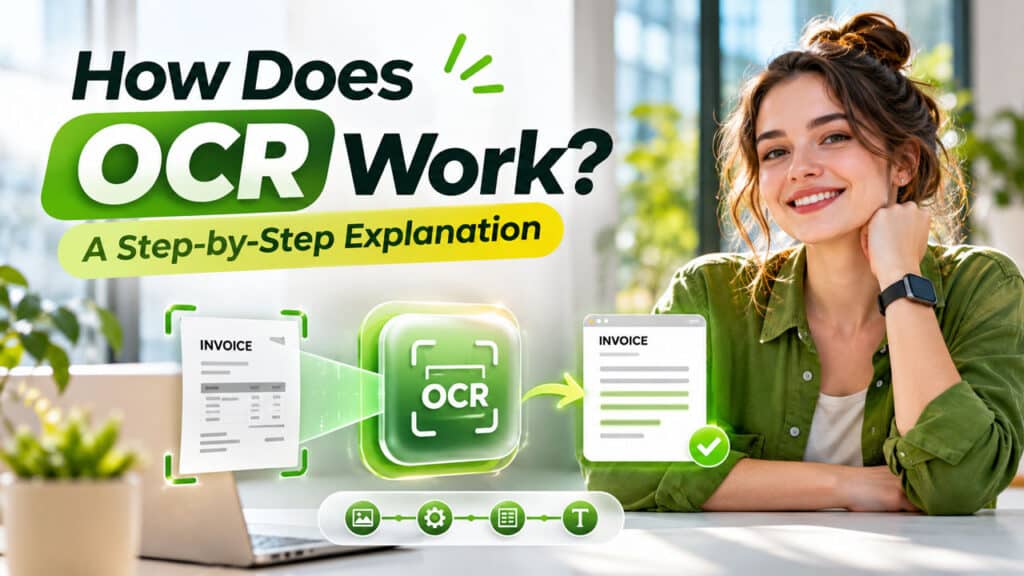
To understand how does OCR work, it helps to look at the different stages involved in converting an image into readable information.
Although the exact implementation varies between OCR tools, most systems follow a similar workflow.
Step 1: Image Acquisition
The first stage of the OCR process is collecting the document or image that contains the text.
The input can come from different sources, such as:
- Scanned paper documents
- Photographs taken using smartphones
- Image-based PDF files
- Screenshots
- Printed invoices and receipts
- Forms and business records
A scanner or digital camera captures the document and converts it into a digital image. The OCR software then receives this image for further processing.
For example, when a company scans a stack of customer registration forms, the scanned images become the input for the OCR system.
The quality of the original image matters because blurry photographs, poor lighting, and low-resolution scans can make text recognition more difficult.
Step 2: Image Preprocessing
After receiving the image, the software improves its quality before attempting to recognize the text.
This stage is an important part of the OCR process because images may contain unwanted marks, shadows, noise, or alignment problems.
Common preprocessing techniques include:
- Noise Removal: Removes unwanted dots, marks, and visual disturbances.
- Image Correction: Fixes tilted or rotated documents to improve readability.
- Binarization: Converts images into contrasting foreground and background areas, often black and white.
- Contrast Enhancement: Makes characters easier to distinguish from the background.
- Image Resizing: Adjusts image dimensions to improve recognition.
For example, imagine scanning an old invoice that is slightly tilted and contains faded text. Preprocessing improves the image so that the OCR engine can identify the characters more accurately.
Step 3: Text Detection and Layout Analysis
Once the image has been cleaned, the OCR system identifies the areas containing text.
Rather than treating the entire image as one block, the software analyzes its structure and separates different sections.
It may identify:
- Headings and paragraphs
- Individual text lines
- Tables and columns
- Numbers and symbols
- Text inside forms
- Different document sections
This step helps the system understand the arrangement of information on the page.
For instance, an invoice may contain a company name at the top, customer information below it, a product table in the middle, and the total amount at the bottom.
Recognizing these different sections helps preserve the original document’s structure and makes the extracted information more useful.
Step 4: Character Recognition
This is the central stage of how does OCR work. After identifying text regions, the software analyzes the shapes of individual characters, words, and text lines.
Traditional OCR systems often use two recognition techniques:
1. Pattern Recognition
Pattern recognition compares the characters in an image with previously stored character patterns.
For example, the software may compare a scanned letter “A” with known examples of the same letter in different fonts and sizes.
2. Feature Extraction
Feature extraction examines the individual characteristics of a character, such as lines, curves, edges, loops, and intersections.
For example, the letter “B” has a vertical line and two curved sections. The software uses these visual characteristics to distinguish it from similar-looking characters.
Modern OCR systems also use machine learning and deep learning models to recognize complete words and text sequences rather than depending only on individual character comparisons.
This makes it possible to handle different fonts, languages, and more complex document layouts.
Step 5: Text Recognition and Language Processing
After identifying individual characters, the software combines them into meaningful words and sentences.
Language processing helps improve recognition by considering spelling, grammar, word patterns, and surrounding context.
For example, if a scanned document contains a character that could be either “O” or “0”, the system may use the surrounding information to determine whether it belongs to a word or a numerical value.
Modern optical character recognition systems can also support multiple languages and recognize different writing styles, depending on their training and capabilities.
However, unclear handwriting, unusual fonts, and poor-quality images can still affect the results.
Step 6: Post-Processing and Error Correction
After the initial recognition stage, the software checks and organizes the extracted text.
This stage may involve:
- Correcting common recognition mistakes
- Checking spelling and formatting
- Organizing text into paragraphs
- Preserving document layouts
- Identifying important fields
- Applying validation rules
For example, if the OCR system extracts a date from an invoice, post-processing may check whether the date follows the expected format.
Some advanced systems also assign confidence scores to recognized text. These scores help identify information that may require manual verification.
This is particularly useful when processing financial records, legal documents, and other business-critical information.
Step 7: Exporting and Storing Extracted Data
The final stage converts the recognized information into a usable digital format.
Depending on the software, the output may be available as:
- Editable Word documents
- Searchable PDFs
- Plain text files
- Excel spreadsheets
- Structured JSON data
- Database records
Businesses can then connect this information with document management systems, CRM platforms, accounting applications, and other business tools. A document parser can further help organize extracted information into structured fields, making it easier to process and manage digital documents.
For example, a company can extract customer names, invoice numbers, and payment amounts from scanned invoices and transfer the information into its accounting system.
This completes the journey from a static image to searchable and usable digital information.
How OCR Technology Explained Through a Simple Example
Let’s understand the complete workflow with a practical example.
Suppose a business receives a scanned invoice containing the following information:
- Customer Name: John Smith
- Invoice Number: INV-1025
- Invoice Date: 15 October 2026
- Total Amount: $1,250
Without OCR, an employee would need to open the document, read the information, and manually enter these details into the company’s system.
With OCR technology, the process becomes simpler:
- The invoice is uploaded as a scanned image.
- The software improves image quality.
- It detects the text and identifies different sections.
- It recognizes the customer name, invoice number, date, and amount.
- It checks and organizes the extracted information.
- The final data is exported into a digital format.
- The business can transfer the information into its accounting or document management system.
This example demonstrates how OCR reduces repetitive data entry and makes document processing more efficient.
What Are the Common OCR Applications?
Today, OCR is used across different industries to simplify document processing and improve access to information.
Some common OCR applications include:
1. Banking and Finance
Banks use OCR to extract information from checks, account statements, loan applications, and financial documents. It helps reduce manual data entry and supports faster document processing.
2. Healthcare
Healthcare organizations use OCR to digitize patient records, prescriptions, medical forms, and reports. This makes information easier to search and manage.
3. Education
Educational institutions can use OCR to convert printed books, notes, and academic documents into searchable digital content.
4. Retail and E-commerce
Retail businesses use OCR to extract product details, prices, barcodes, and information from invoices and receipts.
5. Logistics and Transportation
OCR helps identify information from shipping labels, delivery documents, vehicle registration plates, and other transportation records.
6. Business Document Management
Companies use OCR to digitize contracts, employee records, customer forms, and other important documents, making information retrieval easier.
What Are the Main Benefits of OCR?
Implementing OCR can provide several advantages for businesses and individuals.
1. Reduced Manual Data Entry: OCR extracts information automatically, reducing the need to type details from physical documents.
2. Improved Productivity: Employees can spend less time handling repetitive paperwork and more time on important business activities.
3. Better Document Accessibility: Searchable digital documents make it easier to locate specific information without manually reviewing every page.
4. Reduced Storage Requirements: Businesses can maintain digital document collections instead of depending entirely on physical paperwork.
5. Faster Data Processing: Large volumes of documents can be processed more efficiently, particularly when OCR is integrated with automated workflows.
6. Improved Information Management: Extracted information can be organized and transferred into different business applications for further use.
What Are the Limitations of OCR?
Although OCR offers several benefits, it is not completely error-free.
Its accuracy may decrease when documents contain:
- Blurry or low-resolution images
- Unusual fonts or decorative text
- Poor handwriting
- Damaged or faded pages
- Complex tables and layouts
- Multiple languages or mixed writing styles
Additionally, OCR extracts text but does not always understand the complete meaning or business context of a document.
For this reason, businesses should review important extracted information before using it for financial transactions, legal decisions, or other critical activities.
Conclusion
Understanding how does OCR work helps explain why this technology has become an important part of modern document management and business automation. From capturing an image and improving its quality to detecting characters, recognizing text, and exporting digital information, OCR follows a series of steps that transform static documents into usable data.
With advancements in artificial intelligence and machine learning, OCR systems are becoming more capable of handling different document formats, languages, and complex layouts.
For businesses that regularly manage invoices, forms, receipts, and scanned records, OCR can reduce repetitive work, improve information accessibility, and support more efficient digital workflows.