 Continue with Google

 Share on media
Every business deals with a flood of emails. Invoices, order confirmations, customer enquiries, lead forms, and support requests all land in the inbox, and somebody has to turn that information into something useful. This is where two terms often get mixed up: email parsing and email extraction.
They sound almost identical, and many people use them as if they mean the same thing. They do not. Understanding email parsing vs email extraction helps you choose the right tool, save hours of manual work, and avoid messy data. In this guide, we explain both in plain language, compare them side by side, and show you when to use each one.
What Is Email Parsing?
Email parsing is the process of reading an email and breaking it into structured, organized pieces. Think of an email as a messy box of papers. A parser opens the box, sorts everything, and puts each item in the right folder.
A typical email has several parts: the header (sender, receiver, date, subject), the body (the actual message), and attachments (PDFs, images, spreadsheets). Email parsing identifies each of these parts and then reads the content using rules, templates, or AI. The result is clean data, such as an order number, a customer name, an invoice total, or a delivery date, that can be sent straight into a CRM, spreadsheet, or accounting system.
How Email Parsing Works
The process usually follows a simple path. First, the email arrives in a dedicated inbox or is forwarded to the parsing tool. Next, the parser reads the structure of the message and identifies the sections you care about. Then it applies rules or AI to capture specific fields. Finally, the structured data is exported to another app, often automatically.
For example, if a customer sends an order confirmation, the parser can capture the order ID, product name, quantity, and shipping address, and add them as a new row in your spreadsheet without anyone typing a word.
What Is Email Extraction?
Email extraction is a broader idea. It means pulling specific pieces of information out of a source, and the word “email” can refer to two different things here.
The first meaning is extracting email addresses from websites, documents, PDFs, or databases, usually to build contact lists for outreach and lead generation. The second meaning is extracting data from inside email messages, such as phone numbers, names, dates, or amounts. Both are forms of email extraction, and the common goal is the same: find the data you need and collect it in one place.
Unlike parsing, extraction does not always care about the full structure of the email. It focuses on locating and collecting the target data, whether that is a list of addresses from a company website or a set of phone numbers from hundreds of messages.
How Email Extraction Works
Most extraction tools scan a source and look for patterns. An email address, for instance, always follows a recognizable format: some text, an “@” symbol, and a domain name. The tool finds every match, removes duplicates, and gives you a clean list you can download. Extraction of data from email bodies works the same way, using pattern recognition or AI to spot names, dates, and numbers.
The Difference Between Email Parsing and Email Extraction
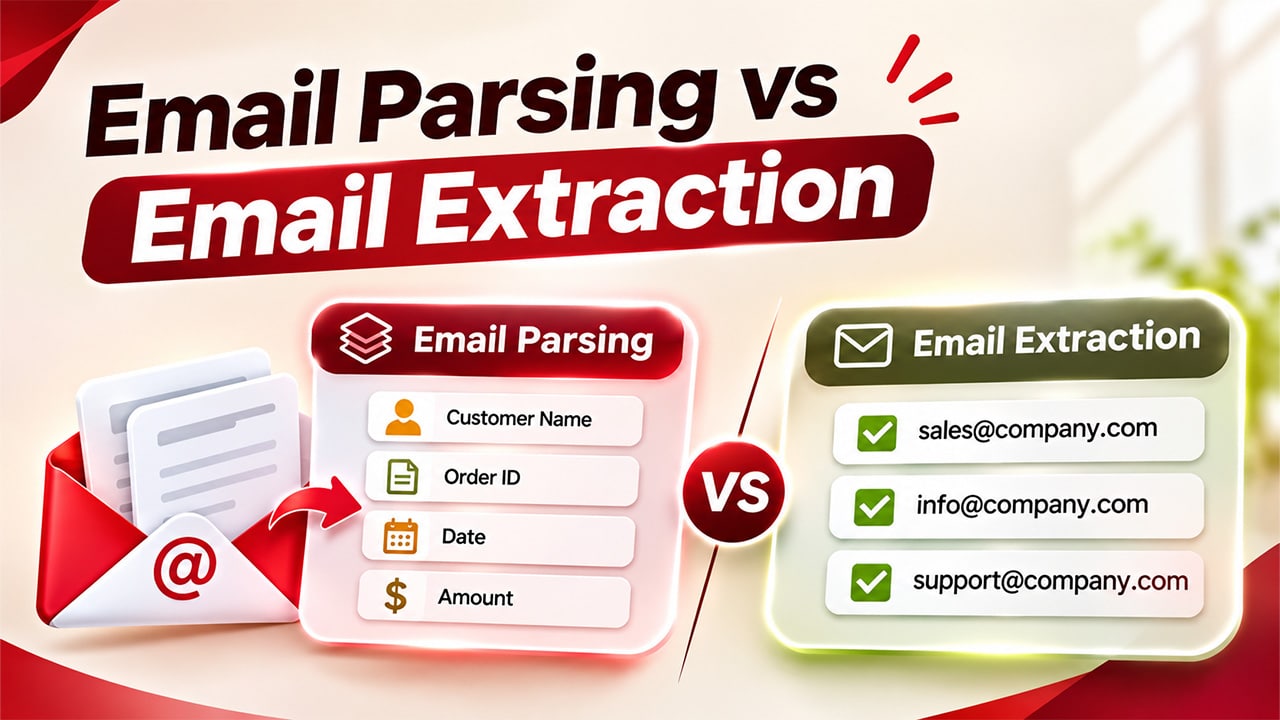
The simplest way to remember the difference between email parsing and email extraction is this: parsing is about understanding the structure of an email, while extraction is about collecting specific data. Parsing organizes the whole message. Extraction grabs only what you ask for.
Here is a quick side-by-side comparison:
| Feature | Email Parsing | Email Extraction |
|---|---|---|
| Main purpose | Break an email into structured fields | Collect specific data or addresses |
| Scope | Reads the whole email (header, body, attachments) | Targets only selected data points |
| Input source | Incoming emails | Emails, websites, PDFs, documents, databases |
| Output | Organized, field-by-field data | A list of addresses or data points |
| Typical use | Invoices, orders, lead forms, support tickets | Lead generation, contact lists, outreach |
| Level of automation | Often fully automated and ongoing | Usually run on demand or in batches |
| Best for | Workflow and process automation | Building contact and data lists |
| Skill needed | Basic setup of rules or templates | Very little, often one click |
As the table shows, the two overlap but are not the same. A parser could use extraction techniques to capture a field, and an extraction tool might do light parsing to find an address. Still, their core jobs differ.
Real-World Examples

Examples make the difference much easier to see.
Example of Email Parsing
An accounts payable team receives hundreds of supplier invoices by email each week. A parser reads each message, finds the invoice number, due date, vendor name, and total amount, and sends them directly into the accounting software. Nobody opens the attachments or retypes figures. The process runs in the background all day.
Example of Email Extraction
A marketing team wants to reach local businesses in a particular industry. They use an extraction tool to collect publicly listed contact addresses from company websites and directories, then verify and organize them into a list for outreach. Here, the goal is not to understand an email but to collect addresses quickly.
When Should You Use Email Parsing?
Choose parsing when emails are a regular part of your workflow and the information inside them needs to trigger an action. It works best when the emails follow a similar pattern, such as order confirmations, booking requests, job applications, or web form notifications. If your team is copying and pasting details from emails into other systems every day, parsing can remove that repetitive work and reduce human error.
When Should You Use Email Extraction?
Choose extraction when your goal is to gather data rather than process a continuous stream of messages. It suits lead generation, building prospect lists, collecting contact details from documents, or pulling phone numbers and names from a large set of files. It is also helpful for one-time projects, like cleaning up an old archive and listing every contact inside it.
Which One Is Right for Your Business?
A good rule of thumb is to look at your daily pain point. If you are drowning in incoming emails that need to be read and entered into other systems, you need an Email Parser to organize and automate that flow, and you can compare options in this guide to email parsing software. If you need to build a list of contacts or collect specific details from many sources, an extraction tool is the better fit.
Also keep accuracy and compliance in mind. Whichever method you use, collect only data you are allowed to use, respect privacy laws such as GDPR and CAN-SPAM, and verify what you collect so that your lists stay clean and your sender reputation stays healthy.
Can You Use Both Together?
Yes, and many teams do. Parsing and extraction work well as a pair. For example, you might parse incoming lead emails to capture the sender’s details and message, and then use extraction to enrich that record with additional contact information from other sources. Together they create a smoother pipeline, from the moment data arrives to the moment it is ready to use.
The biggest benefit of combining them is consistency. Instead of working with scattered, unstructured information, you end up with tidy, searchable records. If you want to go deeper into the second half of this pairing, our guide to email data extraction explains how businesses pull useful details out of messages and why it matters.
Conclusion
The debate around email parsing vs email extraction comes down to purpose. Email parsing reads and organizes the full structure of an email so the data can flow into your systems automatically. Email extraction collects specific information, such as addresses or contact details, so you can build lists and use them for outreach or analysis. Neither is better in every case; the right choice depends on what you want to achieve.
If you are new to the topic and want a clear starting point, read our beginner-friendly explainer on what is email parsing. Once you understand the basics, picking the right approach for your workflow becomes much easier.