


 Continue with Google

 Share on media
Email spoofing presents a serious risk to businesses since attackers can forge messages from a company domain. DMARC enables a domain owner to provide instructions to receiving mail servers regarding messages that have failed email authentication in order to mitigate risks related to spam, phishing, spoofing, and other concerns.
A comprehensive understanding of what DMARC is by businesses leads to better decisions about domain security. This guide provides information on the purpose of the standard, its functionality with SPF and DKIM records, and the policies it provides for the security of legitimate email for many businesses and organizations that send email.
What Is DMARC?
The standard, which stands for Domain-based Message Authentication, Reporting & Conformance, is an email authentication standard that builds on SPF and DKIM. It focuses on reducing domain spoofing by allowing a domain owner to specify what recipient mail servers should do with messages that have failed authentication attempts.
The standard makes use of a DNS TXT record that a recipient mail server evaluates. The DNS record contains information indicating which action should be taken for a given message, as well as general information such as reporting addresses. In addition, report addresses contained in the record allow domain owners to receive reports concerning the sources of messages sent using their domain.
What Are the Benefits of DMARC?
Aside from providing protection against email spoofing, the standard offers numerous additional benefits. They include enhanced control, increased visibility, improved email trust, and better security measures for a business.
Brand protection
Since it is possible to copy a company’s visible From address and send a fraudulent message, brand reputation and data security can be compromised. The standard reduces the likelihood of brand abuse by providing detailed instructions to recipient servers on emails that have failed authentication. Hence, businesses are better able to protect themselves against phishing attempts and spam.
Better visibility
Many different services can use the same email domain, such as email marketing services, business cloud platforms, customer support, and transactional email providers. Using the standard, businesses can evaluate the sources of messages sent using their domain. They can easily detect unauthorized senders as well as legitimate ones that may need additional authentication or configuration.
Stronger security controls
While the standard does not replace the need for SPF and DKIM, recipient servers need specific instructions on what to do if these records have failed. The standard provides these instructions. In other words, the domain owner specifies what recipient mail servers should do with emails that have failed SPF and DKIM rather than leaving it to the decisions of the recipient.
How Does DMARC Work?
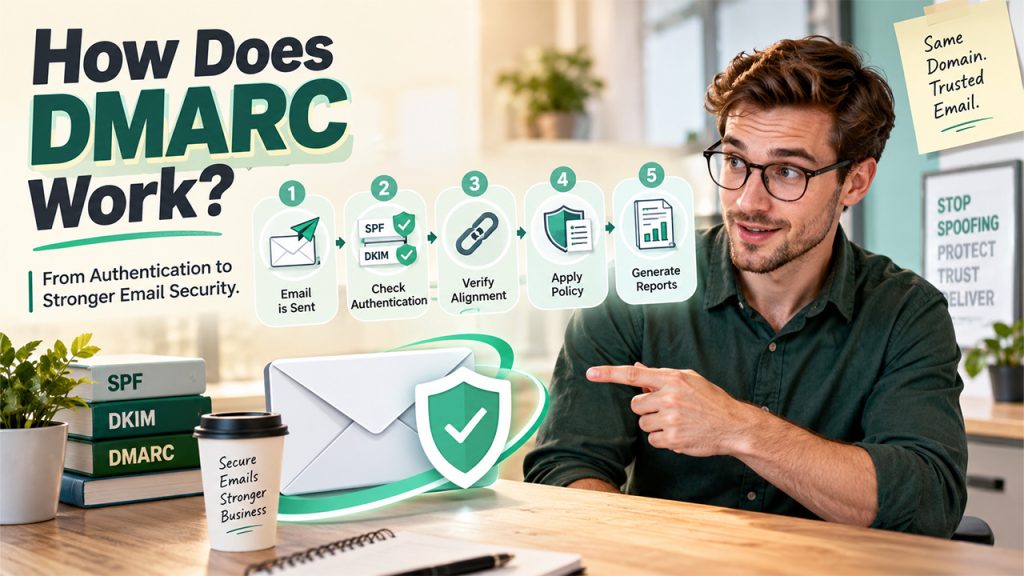
Understanding the five steps helps explain how it interacts with SPF and DKIM, establishes the alignment between a domain and an email address, specifies policies, and accumulates reports about messages for the domain owner.
Step 1: A message is sent
A business, or email service sends an email using their company domain in the From address.
Step 2: The receiving server checks authentication
First, it evaluates the SPF and DKIM records. A passing SPF result indicates that the sending source is authorized by the domain’s SPF record. Next, a passing DKIM result indicates that the message has passed DKIM authentication.
Step 3: The server checks alignment
Having passed SPF and/or DKIM is not sufficient to satisfy the standard. For an email to comply, an aligned domain policy is required for either SPF or DKIM. This prevents an attacker from passing an SPF check on their own domain while DKIM forging another company’s domain.
Step 4: The server applies the policy
Having evaluated the above, the receiving server applies the instructions contained in the TXT record. After applying the policy to the message, the recipient server will deliver it to the appropriate mailbox or the spam/junk folder.
Step 5: A report can be generated
If the standard is configured to do so, reports should be sent by recipient servers. They enable the domain owners to take necessary actions such as identifying legitimate services, fixing misconfigured services, and detecting spoofing attempts.
How Does DMARC Work With SPF and DKIM?
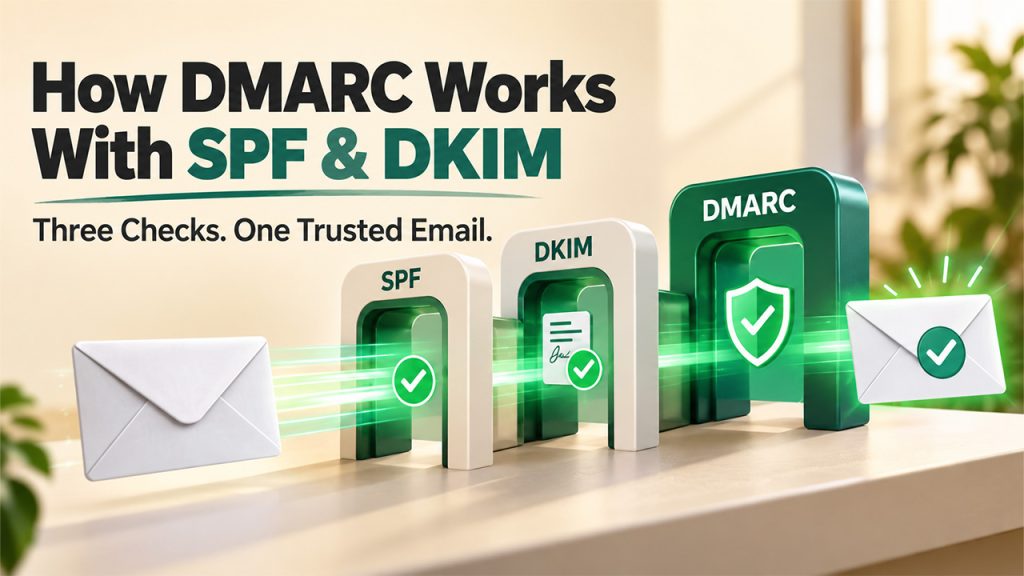
First, SPF focuses on specifying the sources authorized to send an email on behalf of a company. Next, DKIM centers on ensuring that a message has not been altered and comes from a legitimate source. Finally, the standard utilizes the From domain found in an email to determine the policy to be applied to a given message.
Step 1: SPF checks the sending source
Using a DNS record, SPF specifies which servers and services are authorized to send email on behalf of a given domain. Upon receiving an email, the recipient server compares the sending source against the DNS record. If the source is found to be authorized to send email by the domain, a passing result is obtained.
Step 2: DKIM checks the message signature
The email utilizes a DKIM public key found in the DNS to verify that the message has not been forged. If the result is positive, it indicates that the message has not been tampered with and comes from a legitimate sender.
Step 3: Alignment connects authentication to the From address
For the standard to pass, either the SPF or DKIM must pass the alignment check. In this case, for the SPF alignment to pass, the domain that appeared in the message’s From address (the sending domain) must be included in the alignment method in the DNS record. Similarly, for DKIM alignment to pass, the signing domain should be the same as the From domain.
Step 4: The policy controls the result
On the other hand, if either of the aligned records fails, the recipient server applies the instructions (policy) contained in the TXT record to the message. At this point, the standard utilizes the specific instructions contained in the policy (either to take no action, quarantine the email, or reject it).
Step 5: Reports provide feedback
The evaluation results do not have to be entirely hidden. In fact, the five-step process allows administrators to gather statistics on who has been sending email. This makes it easier to discover legitimate sources that may require some configuration in order to prevent them from being classified as spam.
Types of DMARC Policies
These policies provide instructions to recipient mail servers on dealing with messages that fail the standard. It is found in the TXT record of a given domain and usually takes one of the three forms.
None Policy: This instructs recipient servers to take no special action with emails that have failed. It is useful during the setup process since it allows a business to collect reports and, therefore, monitor all messages for unauthorized activity. In conjunction with SPF and DKIM, the ‘none’ policy is a monitoring tool.
Quarantine Policy: This asks receiving servers to take spam action with emails that have failed authentication. It also enables administrators to take action for emails that have falsely triggered spam filters.
Reject Policy: This tells receiving mail servers to reject any emails that have failed authentication. This is the most stringent of the three policies and prevents spoofed emails from reaching the recipient by telling recipient servers to refrain from delivering messages that have failed authentication checks.
Conclusion
DMARC offers businesses an effective way of protecting their domains against spoofing. It also allows businesses greater visibility into who is attempting to use their domain to send spam, phishing, and other fraudulent messages. While the first is used to specify authorized sending sources, the second is applied to verify the authenticity of the signed email message.
Finally, the policy provides guidance on what recipient servers should do if email authentication fails. As part of Email Security Policies, the standard can enhance security and help prevent risks related to spam and phishing. Businesses must continue to monitor authentication results to ensure that they are utilizing an appropriate level of email security.
